
Nunjucks for JetBrains IDEs
First-class Nunjucks templating support for IntelliJ-based editors. Free for 14 days — every feature, no card required.
Start your free 14-day trial Then $12, once · no subscription
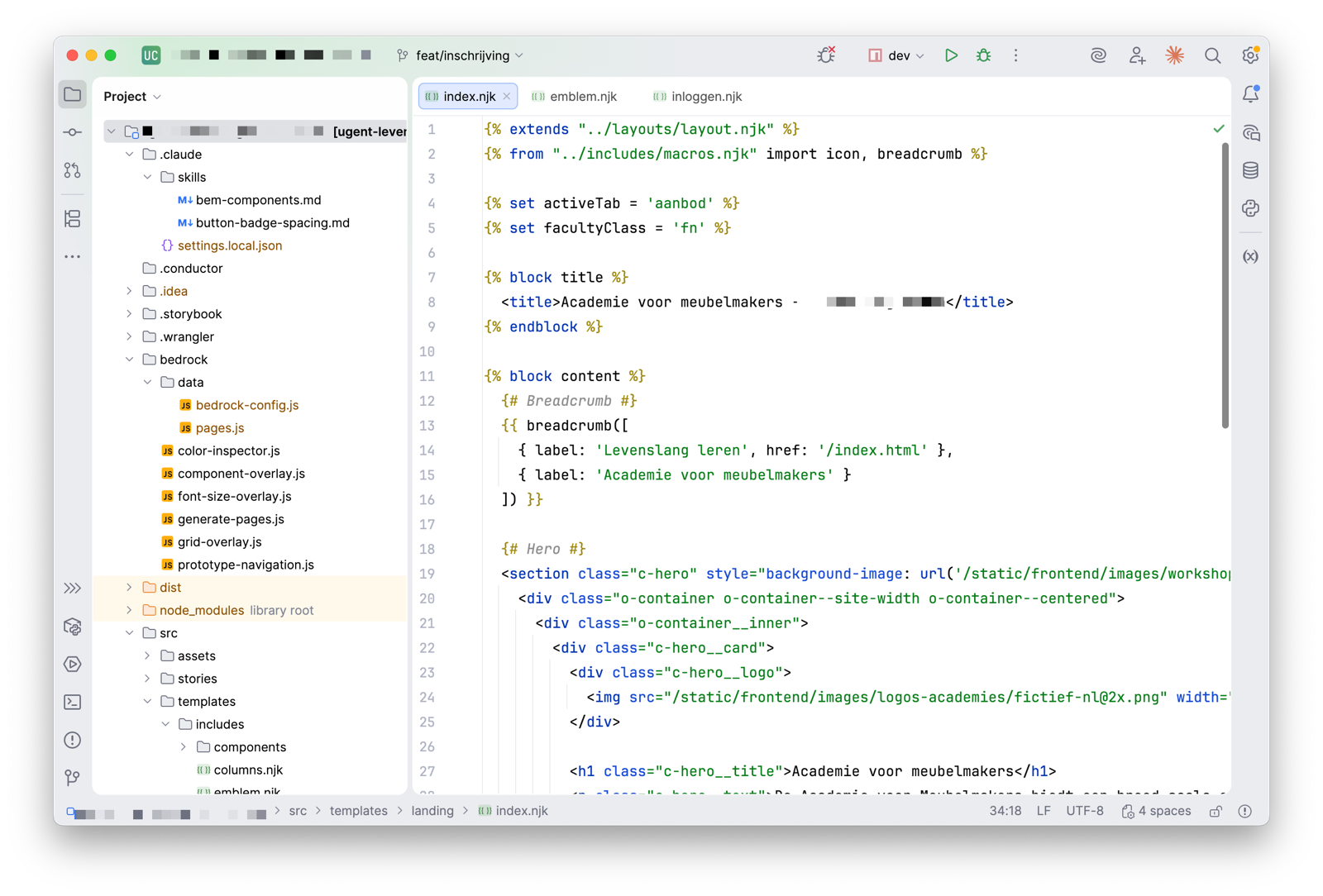
Nunjucks, as your IDE sees it
Every token below is coloured by the same lexer that ships inside the plugin — the same four states, the same keyword tables, the same fold regions. Switch themes, collapse a block, read the edge cases.
Try the arrows in the gutter. They mark exactly what the editor
folds: the twelve paired tags — if, for,
block, macro, call, filter,
set, raw, verbatim, autoescape,
asyncEach, asyncAll — plus multi-line
{# comments #}.
Works with your JetBrains IDE
- IntelliJ IDEA
- WebStorm
- PhpStorm
- PyCharm
- RubyMine
- GoLand
- RustRover
- CLion
- Rider
- DataGrip
- DataSpell
- Android Studio
What you get
Syntax highlighting
Proper highlighting for Nunjucks tags, filters, and expressions inside .njk and .html files.
Jump to definition
⌘-click (or Ctrl-click) on an {% include %}, {% extends %}, or {% import %} path to open the referenced template instantly.
Template-aware editing
Bracket matching and indentation that understands Nunjucks blocks.
Code folding
Collapse {% block %}, {% for %}, {% if %}, and comment sections to keep long templates readable.
Live templates
Type a short abbreviation and Tab to expand it into a full Nunjucks tag — blocks, loops, conditionals, and includes.
Autocomplete that knows Nunjucks
All 30 built-in tags, 42 filters, 26 tests, and the range, cycler and joiner globals — offered in the right place, so filters only appear after a | and tests only after is. Blocks, macros and {% set %} names you declared come up too.
Rename without grepping
Rename a macro, block or variable and every reference in the file follows. Find Usages works on them too, so you can see what a macro touches before you change it.
Your HTML keeps working
A .njk file is parsed as two trees — one for Nunjucks, one for the markup around it. Tag and attribute completion, colour previews, and CSS and JS assistance run right up to the delimiters, so <a href="{{ url }}"> is still a valid anchor to the IDE. Point the second tree at something other than HTML per project if your templates emit YAML or JSON.
Lightweight
No bloat. Install it, restart, get back to writing templates.
Fourteen days free, then pay once
Every install starts with a free 14-day trial — the whole plugin, nothing held back. Keep it and you buy it a single time on the JetBrains Marketplace — a perpetual licence, so all future updates are included. No subscription and no renewal.
JetBrains handles licensing and billing. The exact terms for each licence type are on the Marketplace listing.
Help & FAQ
Which IDEs are supported?
Twelve of them: IntelliJ IDEA, WebStorm, PhpStorm, PyCharm, RubyMine, GoLand, RustRover, CLion, Rider, DataGrip, DataSpell, and Android Studio. The plugin depends only on the platform, language, and XML modules, so it installs on any IntelliJ-based IDE that ships them.
How do I install it?
Open your IDE, go to Settings → Plugins → Marketplace, search for “Obra Nunjucks”, and click Install. Restart the IDE when prompted.
Which file extensions does it recognise?
Out of the box, the plugin handles .njk files. You can also associate .html, .j2, or any custom extension with the Nunjucks file type via Settings → Editor → File Types.
Why doesn’t my syntax highlighting show up?
The IDE needs to know which files to treat as Nunjucks. Open Settings → Editor → File Types, find Nunjucks in the list, and add the patterns you use — for example *.njk, *.nunjucks, or even *.html. Reopen the file and the highlighting will appear.
Does ⌘-click work for custom template paths?
Yes. The plugin resolves {% include %}, {% extends %}, and {% import %} paths against your project root. If your templates live in a subdirectory, mark it as a Resource Root and the plugin will follow paths from there.
Is there a free trial?
Yes — 14 days, with every feature unlocked. The JetBrains Marketplace runs it for you: install the plugin and the trial starts on its own, no card and no account setup. You only pay if you decide to keep it.
Is the $12 a subscription?
No. It is a one-time purchase. You keep using the version you bought for as long as you like, on as many machines as you personally use.
Do I get updates?
Yes. Bug fixes and compatibility updates for current JetBrains IDE versions are included.
Can I get a refund?
Refunds are handled through the JetBrains Marketplace under their standard refund policy. Reach out at hello@obra.studio if you run into trouble.
Where can I report a bug or request a feature?
Email hello@obra.studio with as much detail as you can: IDE version, plugin version, and a minimal template that reproduces the issue.